It's Tuesday release day! Here's what's new in PostBeagle

Happy Tuesday! This week the beagle redecorated: new landing pages, a brighter template gallery and a few new tricks for your automations. Here's the tour.
31 landing page templates, and a builder to match
Landing pages got a proper wardrobe. There are now 31 templates in six groups: lead magnets, waitlists and launches, events and webinars, offers and discounts, newsletters, and local and services. Every one is built from normal blocks, so you can change any part of it.
The landing page builder got tidied up too. Preview your page at desktop or phone size before it goes out, add a search description in the page settings, and PostBeagle checks with you before you publish, unpublish or delete a page. No more "wait, that was live?" moments.
Want to browse before you sign in? The whole collection is at postbeagle.com/landing-page-templates, with a live preview of each one.
A template gallery you'll want to scroll
The Templates page is now one big gallery of live previews. Hover over a card and it scrolls through the whole email, so you see the bottom of a template as well as the top. Pick a category or search from the bar that stays at the top of the page, then open any template for a closer look at desktop or phone width. The arrow keys flip to the next one, which is dangerously fun.
The same gallery now shows up wherever you pick a template for a campaign or an automation, so it works the same way everywhere.
Wait until a set date
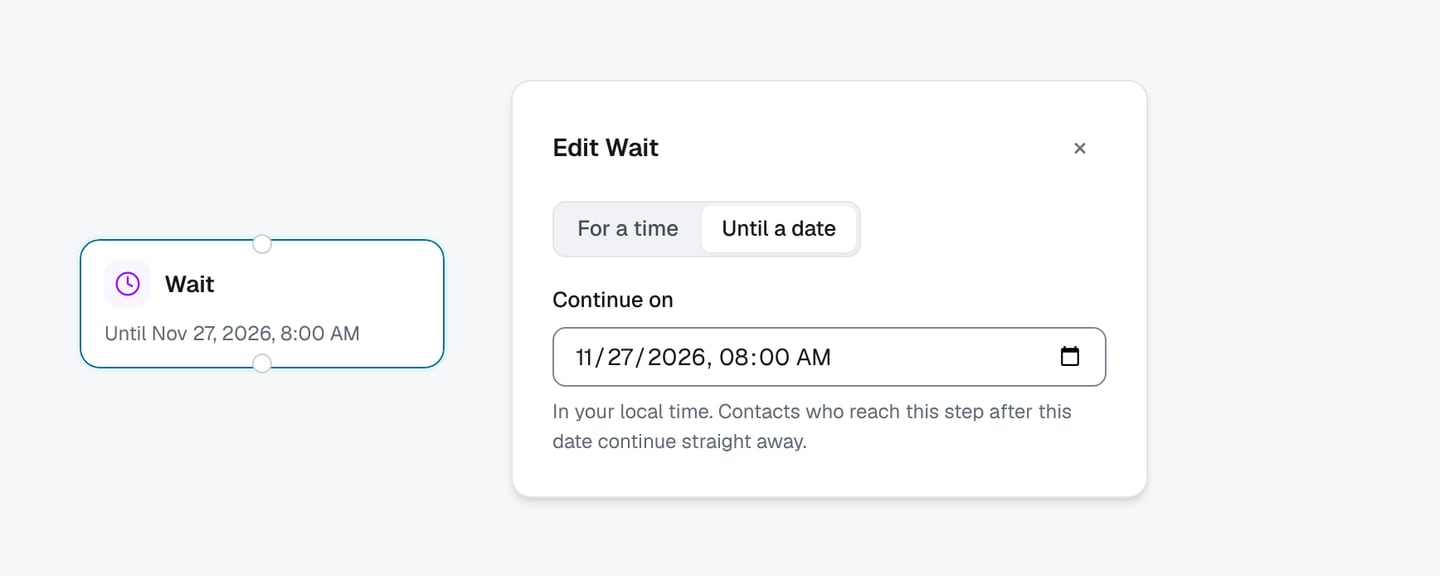
Wait steps in automations used to wait for a set amount of time. Now they can also wait until a date. Pick "Until a date" on a wait step, choose the day and time in your local time, and contacts pause there until then. Anyone who reaches the step after that date carries straight on. Handy for a Black Friday early-access email, or a reminder the morning an event starts.
Your AI assistant can build automations now
If you've connected an AI assistant like Claude to PostBeagle, it can now do a lot more than draft campaigns. Ask it to set up a three-email welcome series, make an abandoned cart flow, save an email template or build a segment, and it will. It can also tell you how an automation is doing and how much revenue email brought in.
You stay in charge: anything an assistant makes arrives switched off, and it can't change an automation that's already on. You review it in the builder and flip the switch yourself. Here's how to connect an assistant.
And a few small things
- Getting started is shorter. New accounts tell us whether they run a store, connect it or import contacts, pick a first automation, and set up the sender and domain on one screen.
- When your sending domain is verified, we email you so you can switch on that first automation.
- Brand kits now hold your website, privacy policy and terms links, and you can drop them into any email with merge tags.
- A round of fixes made landing page signup forms more reliable.
That's it for this week. Happy sending, and see you next Tuesday!