How to Improve Email Deliverability for Large Campaigns

Sending 10,000+ emails is fundamentally different from sending 100. At scale, small deliverability issues become major problems that can tank your entire campaign—or worse, damage your sender reputation permanently.
Whether you're running a SaaS product, managing marketing campaigns, or sending transactional emails, this guide will show you how to maintain excellent deliverability even when sending hundreds of thousands of emails.
Why Large Campaigns Face Unique Deliverability Challenges
When you send bulk emails, you're under much more scrutiny from ISPs. Here's what changes at scale:
- Volume triggers: Sudden spikes in sending volume raise red flags
- Reputation impact: A few spam complaints in 100 emails might go unnoticed; the same percentage in 100,000 emails will hurt you
- Infrastructure requirements: Shared IPs can't handle large volumes effectively
- Rate limiting: ISPs throttle or block senders who don't respect their limits
The Foundation: Technical Infrastructure
1. Choose Between Shared and Dedicated IPs
Shared IP:
- Good for: Under 50,000 emails/month
- Pros: Established reputation, no warmup needed
- Cons: Your reputation depends on other senders
Dedicated IP:
- Good for: 50,000+ emails/month
- Pros: Complete control over reputation
- Cons: Requires warmup period (2-4 weeks)
Pro tip: If you're sending 100,000+ emails monthly, use a dedicated IP. For 500,000+, consider multiple IPs segmented by email type (marketing vs. transactional).
2. Implement Proper Authentication (Non-Negotiable)
For large campaigns, authentication isn't optional—it's mandatory.
SPF (Sender Policy Framework): Think of this as a guest list. It tells email providers which servers are allowed to send emails on your behalf.
DKIM (DomainKeys Identified Mail): This is like a digital wax seal on your envelope. It proves that the email hasn't been tampered with during transit.
DMARC (Domain-based Message Authentication): This is your instruction manual for email providers. It tells them what to do if an email fails the SPF or DKIM checks (e.g., reject it or mark it as spam).
3. Set Up Proper DNS Records
Beyond authentication, configure:
- Reverse DNS (PTR): Your IP should resolve to your sending domain
- MX records: Even if you don't receive email, having MX records adds legitimacy
- Custom tracking domain: Use your own domain for tracking links instead of generic ones
List Management at Scale
The 80/20 Rule of List Quality
80% of your deliverability success comes from 20% of your efforts—and that 20% is list quality.
Implement these hygiene practices:
- Remove hard bounces immediately: Never send to an address that hard bounced
- Suppress soft bounces: After 5 attempts over 30 days, remove them
- Monitor engagement: Segment subscribers by last engagement date
- Implement sunset policies: Remove subscribers who haven't engaged in 6-12 months
Segmentation Strategies for Better Deliverability
Don't send the same message to everyone. Segment by:
- Engagement level: Highly engaged, moderately engaged, at-risk, inactive
- Recipient domain: Gmail, Outlook, Yahoo, corporate domains
- Geographic location: Time zones matter for engagement
- Subscriber lifecycle: New, active, churning
Example workflow:
- Day 1: Send to highly engaged (last 30 days)
- Day 2: Send to moderately engaged (31-90 days)
- Day 3: Send to at-risk (91-180 days) with re-engagement content
- Skip: Inactive (180+ days) until re-engagement campaign
Sending Strategy: The Art of Throttling
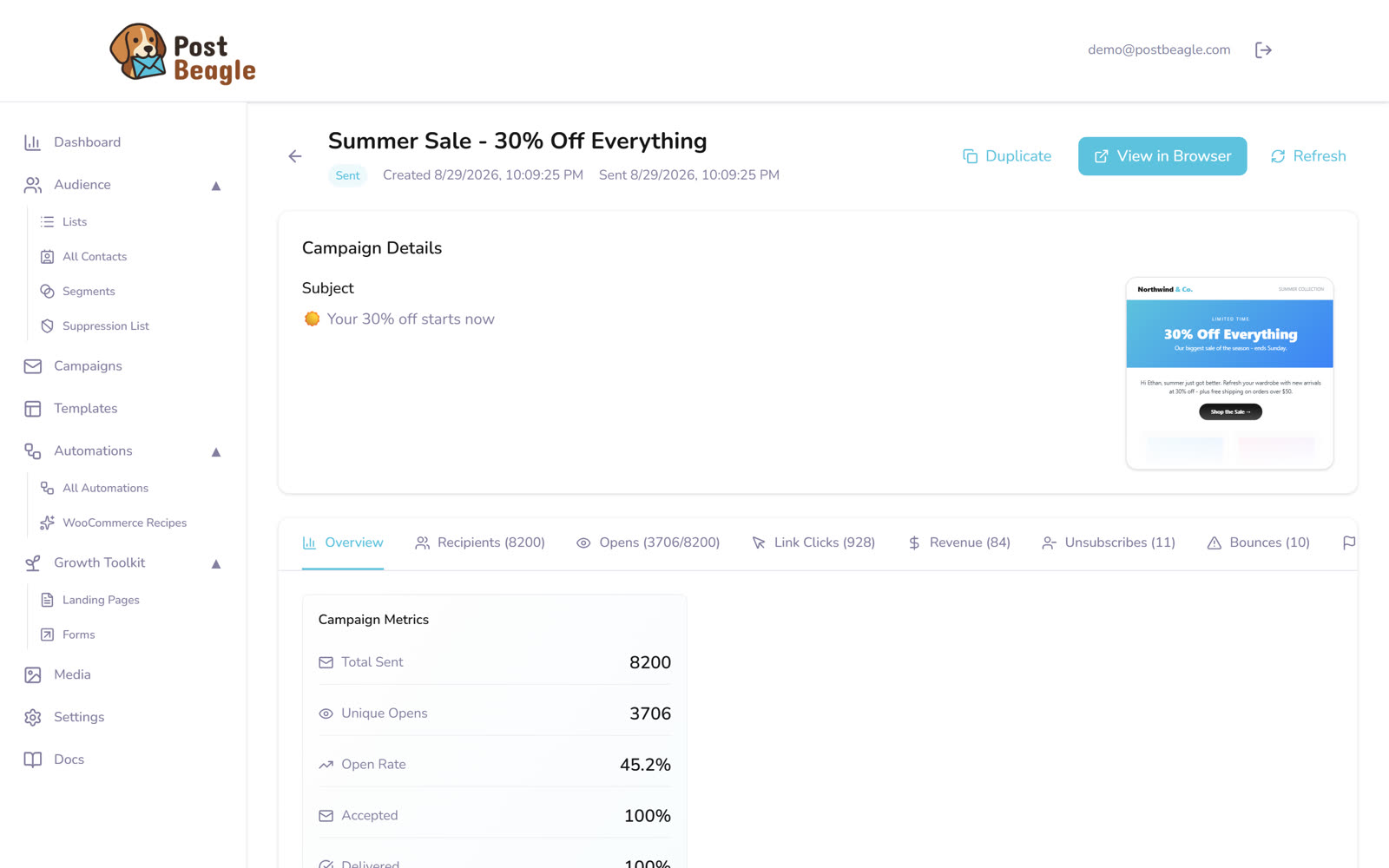
A throttled send of 8,200: everything accepted and delivered, with ten bounces and eleven unsubscribes across the whole campaign.
Respect ISP Rate Limits
Different ISPs have different tolerance levels. Gmail, Outlook, and Yahoo all have limits on how many emails they will accept from you in a given time period.
Postbeagle automatically handles this: Our smart sending algorithm adjusts rates based on real-time feedback from ISPs.
The Warmup Process (Critical for Dedicated IPs)
If you have a new dedicated IP, you can't just start sending at full volume. You need to "warm it up" by gradually increasing the volume over time.
Week 1: Start small (50-100 emails) and double daily. Week 2-4: Continue doubling volume every few days until you reach your target.
Golden rule: Maintain engagement rates above 20% during warmup. If engagement drops, slow down.
Content Optimization for Bulk Sends
HTML Best Practices
Keep your email code clean and simple. Avoid overly complex layouts or heavy code that can trigger spam filters.
Text-to-Image Ratio
Aim for 60% text, 40% images. Too many images trigger spam filters.
Pro tip: Always include alt text for images and provide a text-only version.
Subject Line Optimization
For large campaigns, subject lines need to be:
- Specific: "Your Q4 analytics report" beats "Important update"
- Personalized: Use merge tags thoughtfully
- Honest: Never mislead—it kills engagement and reputation
- Tested: A/B test with 10% of your list before full send
Monitoring and Response
Key Metrics to Track
Deliverability metrics:
- Inbox placement rate (target: 95%+)
- Bounce rate (target: <2%)
- Spam complaint rate (target: <0.1%)
Engagement metrics:
- Open rate (benchmark: 15-25% for B2B)
- Click rate (benchmark: 2-5%)
- Unsubscribe rate (target: <0.5%)
Set Up Real-Time Alerts
Configure alerts for:
- Bounce rate spikes (>5%)
- Spam complaints (>0.2%)
- Sudden drops in open rates (>20% decrease)
In Postbeagle: Navigate to Settings → Alerts to configure thresholds.
Advanced Tactics for Maximum Deliverability
1. Implement Feedback Loops
Register for feedback loops with major ISPs to receive spam complaints directly. This lets you remove complainers before they damage your reputation.
2. Use Engagement-Based Sending
Send to your most engaged subscribers first. High engagement in the first batch signals to ISPs that your email is wanted, improving deliverability for subsequent batches.
3. Maintain Consistent Sending Patterns
ISPs trust consistency. If you send 50,000 emails every Tuesday at 10 AM, keep that pattern. Sudden changes look suspicious.
4. Separate Transactional and Marketing Emails
Use different subdomains or IPs for transactional emails (like password resets) and marketing emails (like newsletters). This protects your critical transactional emails if marketing campaigns have issues.
Troubleshooting Common Large-Scale Issues
Problem: Sudden Drop in Deliverability
Diagnosis checklist:
- Check for blacklist listings
- Review recent bounce and complaint rates
- Verify authentication records are still valid
- Check for content changes that might trigger filters
Solution: Pause sending, fix the root cause, then resume gradually.
Problem: Gmail Deliverability Issues
Gmail is notoriously strict. If you're having Gmail-specific issues:
- Register for Google Postmaster Tools
- Check your domain reputation score
- Review spam rate (must be <0.1%)
- Ensure DMARC is properly configured
- Improve engagement with Gmail users specifically
Problem: High Bounce Rates
If >5% bounce rate:
- Immediately stop sending
- Identify bounce sources (old list? Bad acquisition?)
- Implement double opt-in for new subscribers
- Use email verification at signup
How Postbeagle Optimizes Large Campaign Deliverability
Postbeagle is engineered specifically for high-volume sending:
- Automatic throttling: We respect ISP rate limits automatically
- Smart IP rotation: For multi-IP setups, we distribute load intelligently
- Real-time bounce handling: Bounces are processed and suppressed instantly
- Engagement-based sending: Prioritize engaged subscribers automatically
- Detailed analytics: Track deliverability metrics per ISP, campaign, and segment
- Warmup automation: Our system handles IP warmup for you
Your 30-Day Deliverability Improvement Plan
Week 1: Foundation
- Set up SPF, DKIM, DMARC
- Clean your list (remove bounces, inactive)
- Segment by engagement level
Week 2: Optimization
- Implement proper throttling
- Set up feedback loops
- Create re-engagement campaign for at-risk subscribers
Week 3: Testing
- A/B test subject lines and content
- Test inbox placement across ISPs
- Optimize send times based on engagement data
Week 4: Scaling
- Gradually increase volume
- Monitor metrics daily
- Adjust strategy based on data
Conclusion
Improving deliverability for large campaigns isn't about one magic fix—it's about building a robust system that ISPs trust. Focus on:
- Technical foundation: Authentication, infrastructure, DNS
- List quality: Clean, engaged, properly segmented
- Sending strategy: Gradual warmup, proper throttling, consistent patterns
- Content quality: Relevant, valuable, well-formatted
- Continuous monitoring: Track metrics, respond quickly to issues
Get these fundamentals right, and you'll consistently hit 95%+ inbox placement rates, even at massive scale.
Ready to send large campaigns with confidence? Start your free Postbeagle trial and get expert deliverability support included.
Questions about scaling your email infrastructure? Our team is here to help—reach out anytime.