How to Automate Your Email Marketing with Postbeagle
You're spending hours every week manually sending emails. Welcome sequences for new users. Re-engagement campaigns for inactive subscribers. Product updates. Newsletter blasts. It's exhausting, and it doesn't scale.
What if your email marketing could run itself? What if new users automatically received a perfectly-timed onboarding sequence? What if inactive users were automatically re-engaged before they churned?
That's the power of email automation. And with Postbeagle, it's easier than you think.
Why Automate Your Email Marketing?
The Business Case
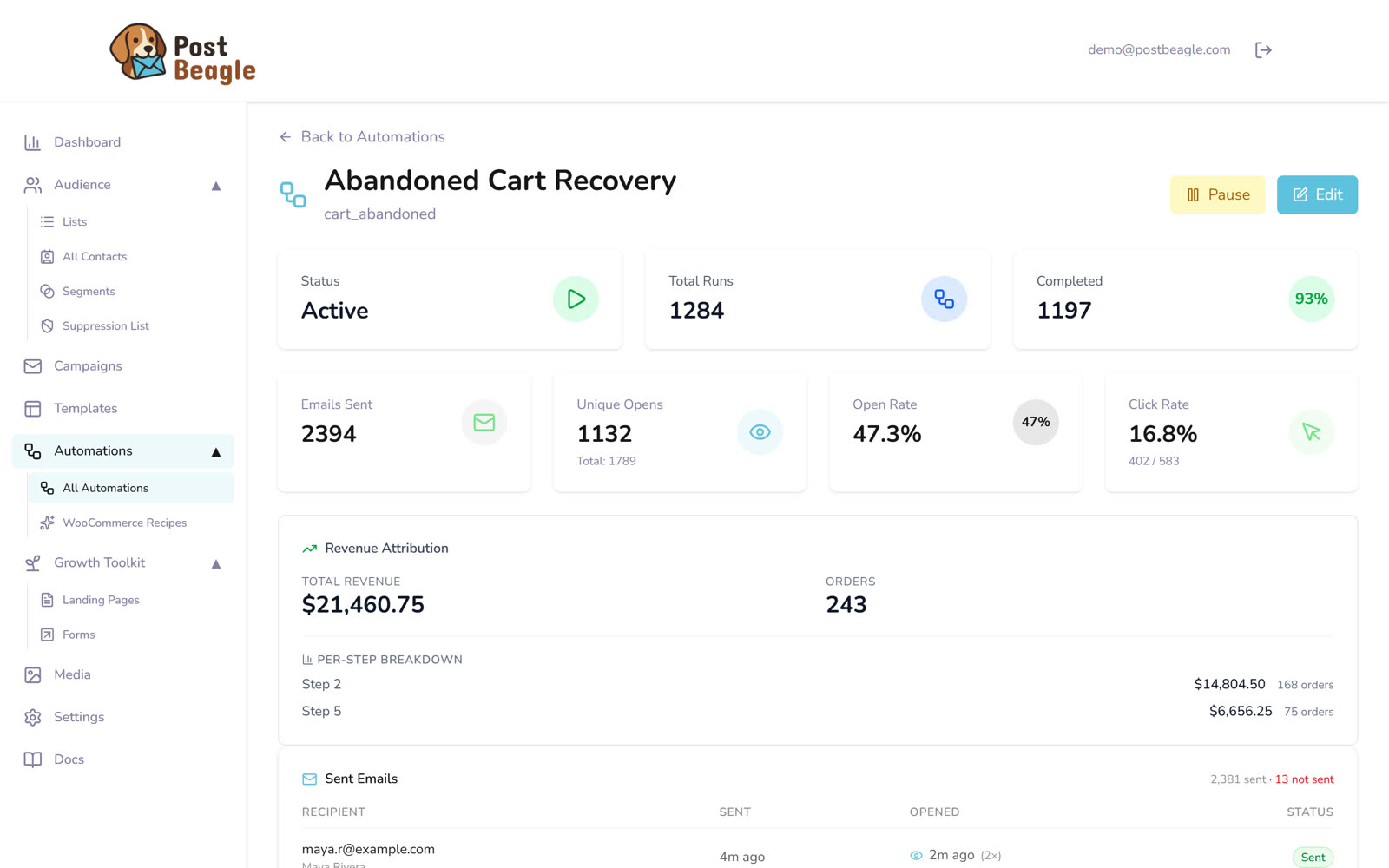
Revenue is attributed per step, so you can see which message in the sequence actually earned the order.
Time savings: Manual sending takes hours. Automated workflows take minutes to set up and run forever.
Better results: Automated emails get significantly higher open and click rates because they are timely and relevant.
Scalability: Automation allows you to treat every customer like a VIP, whether you have 100 or 100,000 subscribers.
What You Can Automate
User lifecycle:
- Welcome sequences
- Onboarding flows
- Feature adoption campaigns
- Upgrade/upsell sequences
- Renewal reminders
- Win-back campaigns
Behavioral triggers:
- Abandoned cart recovery (see how it works for WooCommerce)
- Post-purchase follow-ups
- Feature usage milestones
- Inactivity alerts
- Re-engagement campaigns
The 5 Essential Automated Workflows Every SaaS Needs
1. Welcome Sequence (The Most Important Workflow)
Your welcome sequence sets the tone for the entire customer relationship. Get it right, and you'll see higher activation and lower churn.
Goal: Get new users to their "aha moment" as quickly as possible
Structure:
- Email 1 (Immediate): Welcome message and quick win.
- Email 2 (24 hours later): Educational content and key features.
- Email 3 (3 days later): Tips, best practices, and support resources.
- Email 4 (7 days later): Advanced features and social proof.
- Email 5 (14 days later): Check-in and feedback request.
2. Onboarding Drip Campaign
Guide users through your product's key features over time.
Goal: Increase feature adoption and product stickiness
Structure:
- Day 1: Core feature #1
- Day 3: Core feature #2
- Day 5: Core feature #3
- Day 7: Integration options
- Day 10: Advanced tips
- Day 14: Success check-in
3. Engagement-Based Workflows
Respond automatically to user behavior.
High engagement workflow: If a user is very active, send them a "power user" email with advanced tips or an upsell offer.
Low engagement workflow: If a user hasn't logged in for a while, send them a re-engagement email with a reason to come back.
4. Upgrade/Upsell Sequence
Automatically move free users to paid plans.
Goal: Convert free users to paying customers
Trigger points:
- Approaching usage limits
- Using advanced features
- High engagement
- Specific time milestones
5. Win-Back Campaign
Re-engage churned or inactive users.
Goal: Recover lost customers or prevent churn
Structure:
- Email 1: "We miss you" - Acknowledge absence and offer help.
- Email 2: "What's new" - Highlight new features and improvements.
- Email 3: "Special offer" - A discount or incentive to return.
- Email 4: "Final goodbye" - Last attempt and feedback request.
Best Practices for Email Automation
1. Start Simple, Then Optimize
Don't try to build complex workflows immediately. Start with a basic welcome sequence and a simple re-engagement campaign. Then iterate based on data.
2. Always Include Exit Conditions
Prevent users from receiving irrelevant emails. For example, stop sending "upgrade now" emails if the user has already upgraded.
3. Monitor and Optimize
Track open rates, click rates, and conversion rates for each workflow. Use this data to improve your emails over time.
4. Personalize Everything
Use merge tags (like {{first_name}}) to make your emails feel personal.
5. Test Everything
A/B test your automated emails just like broadcast emails. Test subject lines, send times, and content to see what works best.
Common Automation Mistakes to Avoid
Mistake 1: Over-Automation
Problem: Sending too many automated emails. Solution: Cap frequency (max 2-3 emails per week per user).
Mistake 2: Ignoring Unsubscribes
Problem: Continuing to send after user unsubscribes. Solution: Respect all unsubscribe requests globally.
Mistake 3: No Human Touch
Problem: Emails feel robotic and impersonal. Solution: Write conversationally, use personalization, offer real help.
Mistake 4: Set It and Forget It
Problem: Never reviewing or updating workflows. Solution: Monthly review of all workflows, quarterly optimization.
Mistake 5: Not Segmenting
Problem: Same workflow for all users regardless of behavior. Solution: Create segment-specific workflows.
Your 30-Day Automation Roadmap
Week 1: Foundation
- Set up Postbeagle account
- Create welcome email sequence
- Test and launch welcome sequence
Week 2: Engagement
- Build onboarding drip campaign
- Create re-engagement workflow
- Launch and monitor
Week 3: Conversion
- Build upgrade/upsell sequence
- Create behavioral triggers
- Launch conversion workflows
Week 4: Optimization
- Analyze all workflow performance
- A/B test key emails
- Optimize and scale
Conclusion
Email automation isn't just about saving time—it's about delivering the right message to the right person at the right time, automatically. With Postbeagle, you can build powerful workflows that drive engagement and revenue while you focus on other things.
Ready to automate your growth? Start your free Postbeagle trial and build your first workflow in minutes.
Need help setting up your automations? Our team is here to help—reach out anytime.
- Set up workflows in minutes, not hours
- Trigger emails based on any user behavior
- Personalize at scale
- Monitor and optimize continuously
- Scale infinitely without adding work
Start with the 5 essential workflows, then expand based on your specific needs. The sooner you automate, the sooner you'll see results.
Ready to automate your email marketing? Start your free Postbeagle trial and build your first workflow in under 10 minutes.
Need help setting up automation? Our team offers free onboarding calls—get in touch.